
Smart home features are more useful and practical these days and less mystifying than ever before! Here’s how you can get started…
What is a smart home?
The term “smart home” refers to a convenience-driven setup in the home that allows owners to automatically control various appliances, lighting, temperature, door locks, security systems, even music and home theater, remotely. These systems are controlled from a smartphone, tablet, or computer through internet connection.
Do you have to be a genius, or at least a technician, to set up and operate a “Smart Home”?
Not at all! Smart home features are more useful and practical these days and less mystifying than ever before. Thanks to improved user-friendly installation and interface, the average homeowner can integrate smart technology into their home with ease, providing convenience, enjoyment, and cost and energy savings.
How can I get started making my home “smart”?
One simple and low-cost way to enter the world of the “Smart Home” is through smart lighting. With smart lighting technology, the homeowner is able to control lights, and nearly any other electrical device, from anywhere via the internet. This can mean using your phone to turn on lights, fans, even coffee pots…with an app, (or voice command through Alexa, Siri, or Google Home), creating a regular schedule for lights to turn on and off (good for security), or lights turning off and on automatically when you leave or arrive home.
What are the benefits of smart lighting?
In a home equipped with smart lighting, the homeowner can reduce and monitor electricity use. This can directly lead to dollar savings and will help conserve energy. But there are lifestyle benefits, too!
In my home, our smart lighting system allows me to tell Siri “Go to bed” as I head upstairs, so all the lights on the main level are turned off at one time. I also like to use “Scenes” and have a lower light setting in the kitchen at breakfast time and a brighter setting for dinner prep in the early evenings. I can instantly have the lighting just right, every day.
A smart home system can incorporate both smart switches and smart plugs to work together to create “Scenes” in a room where certain lights are off or on depending on the ambiance you want to create. You can even set certain lights (for example, an outlet for a Christmas tree) to turn off when you leave the home and turn on when you arrive back home, for safety precautions and energy savings.
Smart switches and smart plugs? More info pls
There are several ways to incorporate smart lighting into your home, and it’s a pretty low-cost entry into the world of the smart home. One easy way is through smart plugs. Activating a smart plug is simple — it takes less than 5 minutes, and cost under $30.00 each. You will connect your plugs to an app (we use the Home app with our Apple products) and then control them through the app.
Another way to incorporate smart lighting in your home is to replace existing light switches with smart switches. While this is a more involved process and more money (around $75 each) per switch than the plugs, the actual installation is basic and can be done by a homeowner (be sure to follow safety precautions if installing these yourself). Many switches are connected to outlets, so you’ll have added options to control more lighting in that instance.
Value Added
Smart home systems such as smart lighting adds value real to your home. You can reduce energy use, which equals dollar savings for you, and if you decide to sell your home, a smart lighting system is an attractive feature to many savvy buyers. Plus, it can convey to prospective buyers that you are a proactive homeowner and have taken excellent care of your home. Some smart plugs can monitor energy use via an app, so you can adjust your usage to save money and energy.
Smart switches and plugs ultimately add convenience and enjoyment to the quality of life in your home! Below are some links to products I have used and others that have been recommended.
Some products to consider:
Lutron Caséta Dimmable smart switches we use in our home:
“Caséta puts the smarts in the switch so you can control your lights a variety of ways – via the free Lutron app your voice or from the wall; you can create personalized schedules to turn on off or dim lights at set times to best fit your everyday routines or activate favorite lighting scenes with the touch of a button.”

The Kasa Smart Wi-Fi Plug Slim are a great value (4 for $38 at the time of my publishing), and this plug also offers energy monitoring, a feature we use in our home. “Use the smart Wi-Fi home plug to monitor your connected device’s energy usage in real-time and view its historical power consumption within the Kasa Smart app.”

Another recommended smart plug:
Levicon Decora Smart Plug “The 2nd Gen mini plug-in design allows for smart plugs to be plugged into a 120V standard, AFCI or GFCI outlet – ideal for controlling multiple devices in areas like living rooms, bedrooms, and kitchens. The integrated button provides manual ON/OFF control at any time. Add optional wire-free 3-way/multi-location where you need it, simply pair with wire-free DAWSC Anywhere Switch Companion (no wiring required).”

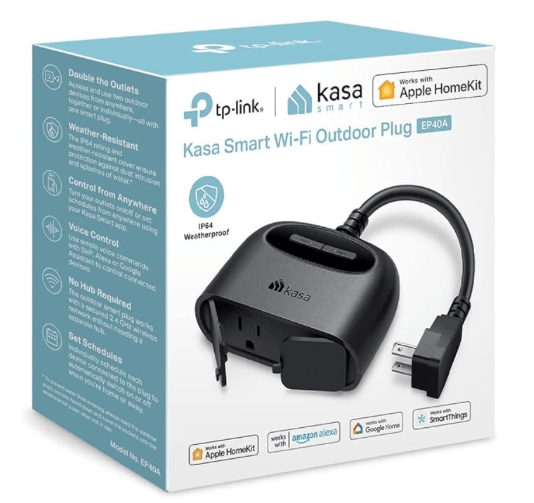
An outdoor smart plug:
Kasa Apple HomeKit Outdoor Smart Plug, 2 Sockets “Remotely power your outdoor smart plug on or off with just a single tap on your phone. Group your indoor and outdoor devices for unified control like combining your living room bulbs with the patio lights connected to your outdoor plug, so you can light up your home for a memorable dinner party.”
Do you utilize smart home features in your home? Please share in the comments below. I’d love to hear about the technologies you use!
Resources:
https://www.nytimes.com/wirecutter/reviews/best-smart-switch/
 Today's Home Perspective
One response to “Smart Home Technology: Getting Started”
Good info and recommendations! It always helps to learn from your personalized experience, so thank you for sharing.
LikeLike